Johann N. Löfflmann • computer scientist
Welcome to my private homepage • computer scientific subjects and more
Jarfix 3.0.0

Description
If you doubleclick on a jar file, and your Java application does not start, your .jar association has been hijacked. You can fix the problem with Jarfix.
The problem ...
The root cause for the problem above is, that a program has stolen the
.jar association. If you have installed the Java Runtime Environment the
first time, the file type called "jar" is assigned to javaw.exe
correctly. "jar" is an abbreviation for "java archive" and javaw.exe is
the correct program to execute a .jar. However, on Windows
any program can steal a file type at any time even if it is already
associated with a program. Many zip/unzip programs prefer to do this,
because a jar is stored in the .zip format. If you doubleclick on
a .jar, your pack program opens the file, rather than javaw runs the
program, because your pack program ignores the meta information which
are also stored in a .jar. In the Oracle bug database there is the
low-priority report 4912211
"add mechanism to restore hijacked .jar and .jnlp file extensions", but
it has been closed as "Closed, Will Not Fix".
You may also miss the file connection with .jar if you are using a free OpenJDK without an installer.
The workaround ...
Reinstall the Java Runtime Environment or fix the Windows Registry
manually each time this problem occurs.
The solution ...
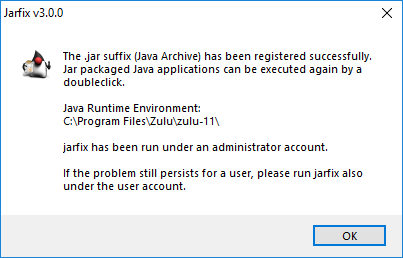
You can fix this problem very easy with the small but reliable  jarfix.exe program. Just
doubleclick on it to restore the .jar association with javaw.exe.
jarfix.exe program. Just
doubleclick on it to restore the .jar association with javaw.exe.
Optional
parameters ...
By default jarfix fixes the problem without any additional
parameters. Nonetheless, there are a few optional parameters
available if you want to customize the behavior of jarfix.
| Optional Parameter | Description |
| /64 | On Windows x64 you can have both a 32 bit JRE and/or a 64 bit JRE installed. By default jarfix searches for the 32 bit JRE first and if a 32 bit JRE is not found it continues to search for the 64 bit JRE. With the /64 option you tell jarfix to search only for the 64 bit JRE/JDK. |
| /a | Option /a adds the menu item called "Run as..." (Windows XP) respectively "Run as administrator" (Windows Vista and Windows 7) to the context menu of the Windows Explorer in order to execute .jar files also with administrator permissions. That can be useful for Java based installers that are stored in the .jar-format, because usually those installers want to write to the Windows program directory where normal users haven't write permissions by default. |
| /h | prints some help (version, author, syntax) and quits the program. |
| /i | sets an alternative icon for .jar files (only necessary for older JREs). |
| /k | forces a search in the Windows Registry for a JDK only. That option skips the search for a JRE. |
| /l | creates a symbolic link called "latest", that points to the JRE/JDK that jarfix can find. An alternatively name of the link can be specified by using an .ini file. See also the section called "Optional configuration file". |
| /s | runs jarfix silently (without any dialogs). That can be useful if jarfix should be launched by a different program or if you want to run jarfix by the Windows' autostart feature. |
| /u | restores the .jar-association for the current user account only. You can use that option if you don't have admin permissions on the computer. The option can be also useful if you are admin and if you actually want to use a different JRE than all other users on the computer. |
| /x | extracts four files and quits the program. The files which are being extracted are: a) jarfix-license.txt, the license of jarfix; b) jarfix.ini, a sample configuration file for the /c option; c) jartest.jar, a tiny Java programcalled Jartest which you can use in order to test the .jar-association; d) jartest-license.txt, the license of Jartest |
| /z | forces a search in the Windows Registry for a JDK only from Azul Systems that has been installed latest using the .msi. That option skips the search for a JRE/JDK from Oracle. |
Many parameters can be used together, for example "jarfix /64 /a /k /s /l" starts the program without any dialogs (/s), searches for a 64bit JDK only (/64 /k), recreates the file association with jar, creates a junction called latest (/l), and adds the menu item called "Run as administrator..." for jar files to the conext menu of the Windows Explorer (/a).
Optional configuration file ...
In order to feed jarfix with an alternate configuration file, simple create a file that has the same name as the .exe, but with .ini extention. The .ini file has to be in the same folder where the .exe is stored. With that config file you can fully control the action that should happen if you double click on a jar file. Options specified on the command line are concatenated with the options specified in the config file. Both detailed instructions and examples can be found in that sample configuration file.
Copyright
Autor: Johann LöfflmannJarfix Copyright © 2002-2019 by Dipl.-Inf. (FH) Johann Nepomuk
Löfflmann
Jarfix is freeware and it has been published under the terms of this license.
The Jarfix logo is Copyright © 2011-2019 by Dipl.-Inf. (FH) Johann
Nepomuk Löfflmann
The jarfix logo is composition of the Duke (released under the new BSD license), the jar icon and the
patch icon (both adapted from the gnome-harm project that has been
released under the CC-BY 3.0). The logo has been created using
Gimp.
Requirements
A Windows based operating system (95/98/ME/NT/2000/2003/2008/XP/Vista/7/8/10). Without a Java Runtime Environment (JRE), jarfix will tell you where you can download the JRE.
Download
jarfix is freeware. You can use it on any Windows computer. You don't need to register or pay for jarfix.
Download from the heise server:
|
Download from the authors' website:jarfix.exe
(Jan 27, 2019)
Filename: jarfix.exe |
FAQ
Why should I use jarfix?
If you have started to modify your registry manually and it still
doesn't work for you, feel free to use jarfix. jarfix can fix the
issue fast, comfortable, complete and correctly. There is no need
to touch the registry manually.
It seems it has no effect on my system
Please just follow the instructions below and you should be save.
1) Make sure that you use the latest jarfix release
from this website.
2) Start jarfix with admin permissions. If you cannot get admin
permission, start jarfix with the option /u by using the
compatibility layer RunAsInvoker
3) If you have started with admin permissions and the issue is still
there for an user, start jarfix also under the user account
I have found a jarfix.exe on a
different web site. Which version is it?
The latest jarfix release can be found on https://johann.loefflmann.net/jarfix.
Run jarfix /h to get the version or generate a hash of your download and
compare the hash with the official jarfix hashes at https://johann.loefflmann.net/downloads/jarfix-hashes.txt
How can I launch jarfix so that the
message dialog does not appear?
jarfix /s
I
have a 64 bit Windows and only installed a 64 bit JRE, how do I
launch jarfix in that case ?
jarfix
I
have installed both a 32 bit JRE and a 64 bit JRE on my Windows x64.
How can I use the 64 bit JRE for .jar-files?
jarfix /64
How can I fix the issue if I don't have admin permissions ?
cmd /c "set __compat_layer=RunAsInvoker && start jarfix /u"
I have installed many Java Runtime Environments (JREs)
on my computer, how can I select a specific JRE for .jar files ?
Create a configuration file called jarfix.ini,
add the property "actions", and start jarfix.
Create a configuration file called jarfix.ini and start jarfix with the option called /c in order to read the configuration file:
jarfix /c
How can I
pass options to jarfix ?
There are many ways to do that:
a) Select Start -> Run ... and
enter the full path to jarfix.exe including options
b) Start the command
prompt cmd.exe and enter the full path to jarfix.exe including
options
c) Create a batch and enter the full
path to jarfix.exe including options
d) Use the Windows Explorer,
create a shortcut from jarfix.exe and modify the properties of the
shortcut
Can I use jarfix in a commercial organization?
Yes.
Can I deploy jarfix.exe with my program (free or commercial)?
Yes.
Can I put jarfix.exe on my homepage so my users can download it from
there?
Yes, but in my opinion it is smart to add a link to this website so your
users can find this website with FAQs, documentation, etc. and also
the latest and greatest jarfix.
Do I need to mention your name or your website?
No, but I like it if you do it.
I would like to recommend your site/program, is this ok?
Yes, absolutely.
I found a site which claims that jarfix is GPLed.
jarfix is freeware which is different to "free software".
Jarfix was never released under the terms of the GPL.
Can I have the sourcecode?
No.
The root cause of the error message is that you are trying to execute a file that is not a jar file at all. BTW, the error message is produced by javaw.exe, so it also indicates that the .jar association with javaw.exe is correct on your computer.
I have got the error message called "Failed to load Main-Class manifest attribute from <jarfile>.jar"
The root cause of the error message is that you are trying to execute a jar file that is not an executable jar file actually. Only executable jar files contain a manifest file. In that manifest file an attribute named "Main-Class" specifies the Java class that will be executed if you double-click on a jar. If that attribute is missing, you will get the error message above. BTW, the error message is produced by javaw.exe, so it also indicates that the .jar association with javaw.exe is correct on your computer.
I have got a message called "The publisher could not be verified.
Are you sure you want to run this software?" What does that mean?
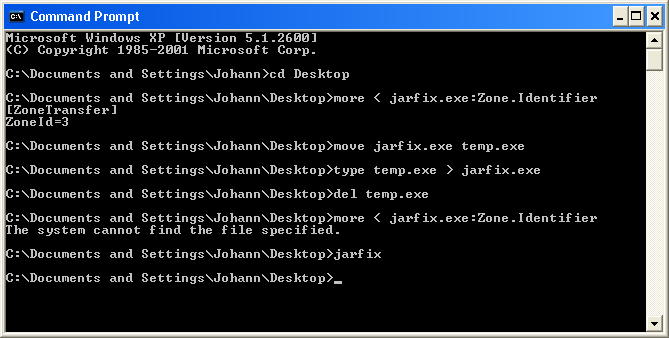
If you download files from the internet to a NTFS formatted partition of
your disc, Windows adds so called Alternate Data Stream metadata
information to those files. This metadata can only exist on NTFS
filesystems and indicates from which Security Zone the file was
originally downloaded. If you try to start an executable from there, you
will get the warning above; files downloaded from the internet could be
dangerous, you know. You can remove the metainfo by copying the file to
a non-NTFS filesystem (such as a floppy or an USB stick) and then
copying it back over the original file. Stream data is not preserved on
FAT or other non-NTFS volumes, so copying the file there strips off the
metadata - Security by "specialists", you know ;) At the command
prompt you can also remove the the ADS metainfo from the NTFS
filesystem - just in case you haven't a FAT formatted volume. In order
to verify the integrity of the jarfix binary, I recommend to calculate
digital fingerprints and check those with integrity tools like Jacksum.
Digests for jarfix are printed at the download
section.
Recommendations


Release Notes
January 27, 2019jarfix.exe v3.0.0
- from Java 11, Oracle does not provide a dedicated JRE anymore, only a JDK,
therefore for x64 and JDK 9+, jarfix 3 will search for a JDK first and then for a JRE, otherwise the latest
Java Runtime Environment could not be found if both JDK 11+ and a JRE version < 11 are being installed
- for Oracle JDK < 9 or on 32-bit platforms, the mature search strategy remains unchained
- added option /k in order to search in the Windows Registry only for a JDK and not a JRE
- added support to find a JDK from Azul Systems in the Windows Registry
- added option /z in order to search in the Windows Registry for a JDK from Azul Systems only
- added option /l in order to create a link called "latest" that points to the
latest JRE/JDK. The symlink will be stored under the JRE/JDK's parent folder.
- removed option /c, because a more comfortable solution exist: if a <jarfix>.ini file exists,
it will be read by the <jarfix>.exe; simply replace <jarfix> with a name of your choice.
That way you can call jarfix with different configurations without the need to go to the command line.
That feature is also useful for setting up a .jar file association for an OpenJDK bundle
that doesn't come with an installer (e. g. the OpenJDK from jdk.java.net or AdoptOpenJDK.net)
- changed all links from http to https
October 18, 2017
jarfix.exe v2.1.0
- support for detecting Java 9 JRE/JDK
March 11, 2012
jarfix.exe v.2.0.0
- support for detecting a 64 bit Java Runtime Environment on 64 bit
Windows
- option to search only for a 64 bit JRE if both 32 bit JRE
and 64 bit JRE are installed (/64)
- option to fix the issue even without admin permissions (/u)
- option to read from a config file in order to fully control the action
that happens if you double click on a jar file (/c)
- option to add the menu item called "Run as..." respectively "Run
as administrator" to the context menu of the Windows Explorer in order
to execute .jar files under the administrator account (/a)
- option to set an alternative program icon for .jar files (/i)
- option to extract a tiny Java program called jartest and the licenses
for both jarfix and jartest (/x)
- the jarfix logo has been used for the program icon
- the title JarFix has been renamed to Jarfix
April 2, 2011
- a small logo for jarfix (homepage only)
March 22, 2010
jarfix.exe v.1.2.0
- jarfix can now fix the jar association even if it has been changed
manually by the user
October 26, 2007
jarfix.exe v.1.1.0
- bug fixed: jarfix does not fix the jar association in every case
- added Windows Vista support
October 21, 2006
until today jarfix has been mentioned on the FAQ page only, now
jarfix has also a homepage
July 30, 2005
jarfix.exe v.1.0.0
- english and german dialogs
- checks whether a JRE is available, if not it asks the user whether the
user want to download a JRE
- determines the latest version of any installed JRE
- restores the .jar association with javaw.exe
- sets a Java icon for the .jar files
June 1, 2003
jarfix.reg has been published in the NumericalChameleon
1.5.0 package.
May 1, 2002
Before jarfix.exe went live, I have pubished the jarfix.reg on my
homepage.